Increasing an EBS Volume with No Downtime
Login to the AWS console
Choose "EC2" from the services list
Click on "Volumes" under "Elastic Block Store" menu (on the left)
Choose the volume that you want to resize. If you don't know what volume you need to change, it may be easier to find the EC2 Instance, click on the Storage tab, and you should see the volume(s) attached to that instance.
Once you have identified the correct Volume, navigate to the details page for that volume.
In the upper right hand corner, click on "Modify Volume".
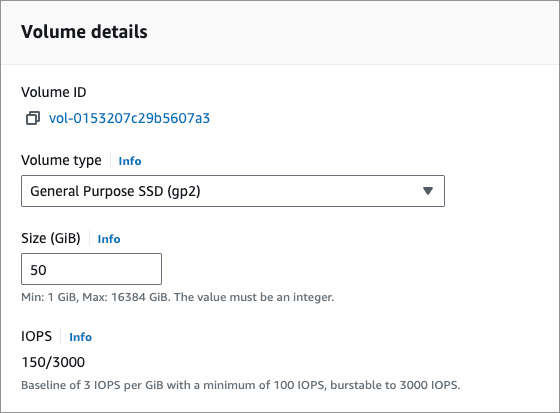
Set the new size for your EBS volume (in this case i extended an 50GB volume to 100GB)
Click on modify.
Now, we need to extend the partition itself.
SSH to the EC2 instance where the EBS we’ve just extended is attached to. You cannot log in as the site user, you must log in as the root user. This is typically the ubuntu user.
Type the following command to list our block devices: lsblk
You should be able to see a similar output:
NAME    MAJ:MIN RM  SIZE RO TYPE MOUNTPOINT
xvda    202:0    0  100G  0 disk
└─xvda1 202:1    0  50G   0 part /
As you can see size of the root volume reflects the new size, 100GB, the size of the partition reflects the original size, 50GB, and must be extended before you can extend the file system.
To do so, type the following command:
sudo growpart /dev/xvda 1
Be careful, there is a space between device name and partition number!
Now we can check that the partition reflects the increased volume size (we can check it with the lsblk command we already used):
NAME    MAJ:MIN RM  SIZE RO TYPE MOUNTPOINT
xvda    202:0    0  100G  0 disk
└─xvda1 202:1    0  100G  0 part /
Last but not least, we need to extend the filesystem itself: sudo resize2fs /dev/xvda1
Finally we can check our extended filesystem by typing: df -h
If everything went right, we should be able to see our effective filesystem extended size:
Filesystem      Size  Used Avail Use% Mounted on
devtmpfs        980M     0  980M   0% /dev
tmpfs           997M     0  997M   0% /dev/shm
tmpfs           997M  440K  997M   1% /run
tmpfs           997M     0  997M   0% /sys/fs/cgroup
/dev/xvda1      100G   1,4G 198G   7% /
You have just extended your EBS volume size with no downtime.